Microsoft Word add-in for law firms Private beta · coming to AppSource

No more midnight cleanup. Every contract in your firm's numbering style.

One late insert and every typed section number after it is wrong — and so is every cross-reference. Formidify puts your contracts on real Word numbering, then catches the cross-references and defined terms that broke. You see every change first, and Word can undo all of it.

Prefer email? support@formidify.ai

193 hand-typed section numbers found in one real operating agreement
221 sections converted to Word auto-numbering in a single pass
0 sentences of your document leave your machine

Real numbers from the 90-second demo below — one hand-numbered operating agreement.

The text of your document never leaves your machine. Formidify's formatting checks run locally, inside Word. If you turn on the optional AI analysis, it receives only redacted structural tokens — style names, section numbers, font names, short defined-term phrases — never your sentences or clauses. Read exactly how it works

From first draft to signature

Not just a cleanup tool — it keeps the numbering right the whole way through

Build your firm's numbering style once. Formidify uses it at every stage of a deal, inside Word.

Start

A blank document becomes a numbered outline in your house style, ready to draft into.

Draft

Add a section anywhere, at any level — everything after it renumbers itself.

Restyle

Opposing counsel's draft, converted to real numbering and put on your style — previewed level by level.

Proofread

Broken cross-references, drifting defined terms, mismatched headings — caught before it goes out.

Start, Draft and Restyle need Word for desktop (Microsoft 365). Nothing changes until you say so.

What Formidify does

The fixes that save hours of manual cleanup

Rules-based checks do the heavy lifting. Nothing is changed until you say so.

Review & repair

Fix formatting issues in one pass

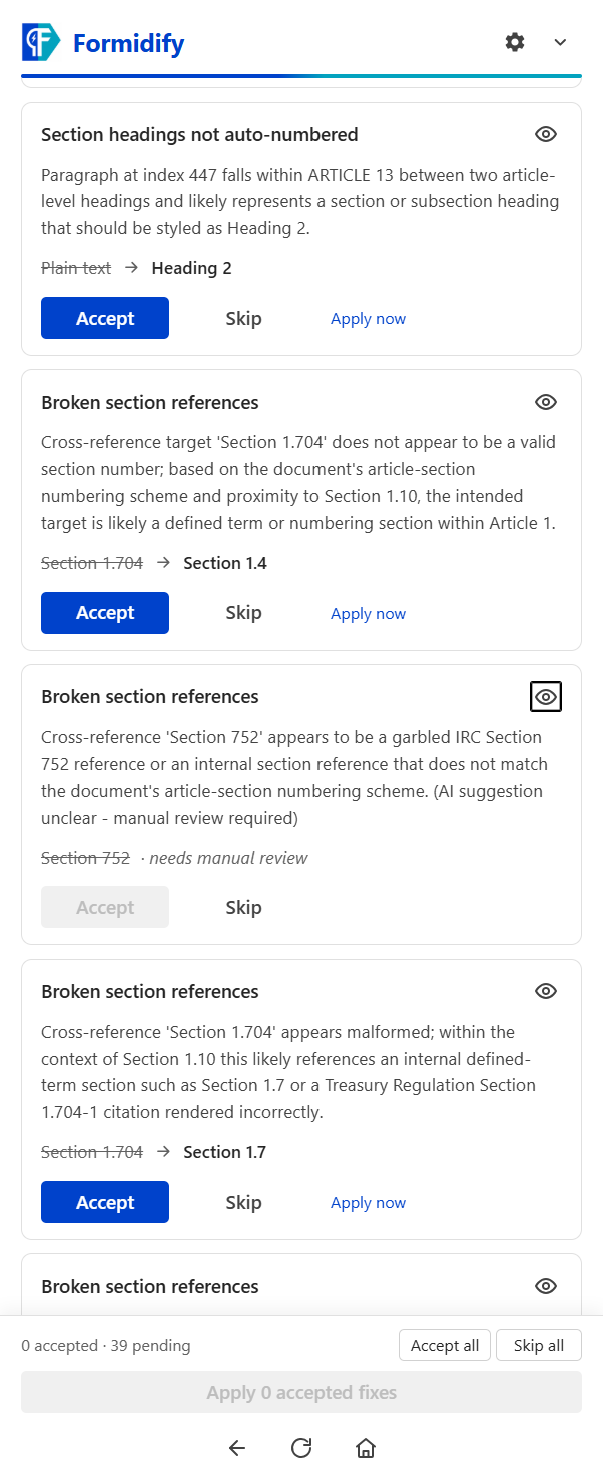
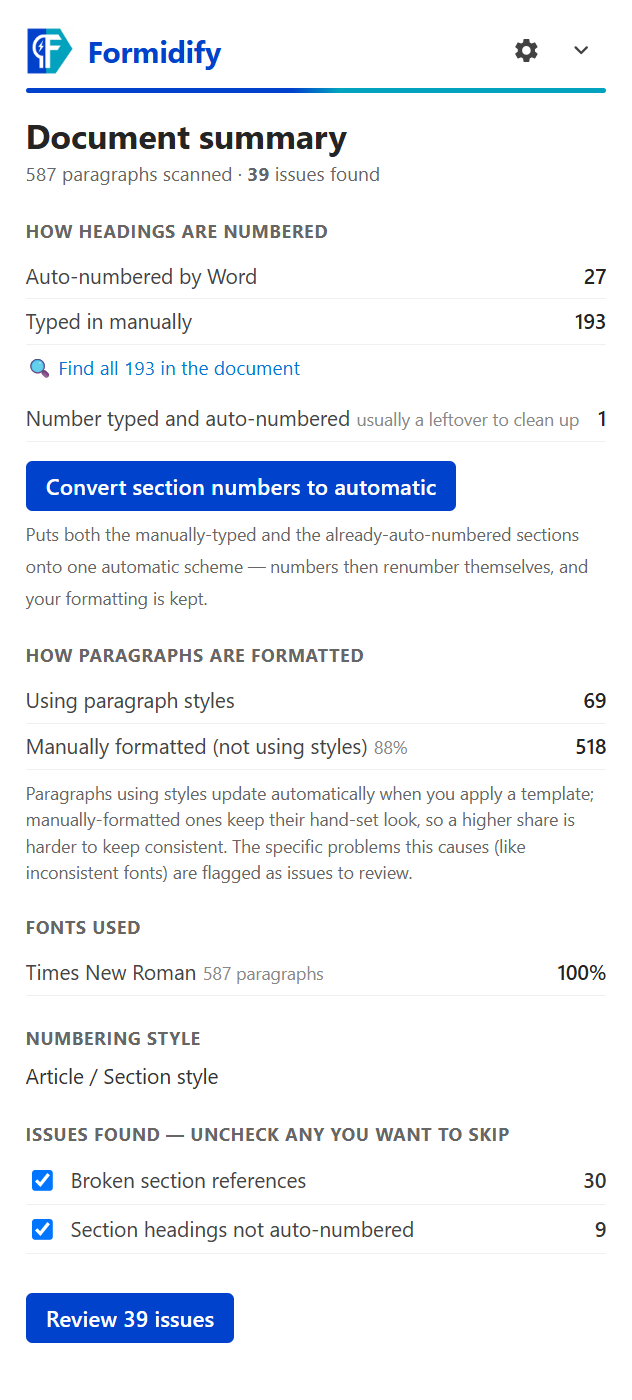
Formidify scans your document and shows a plain-English summary: how sections are numbered, which paragraphs use styles, and which fonts appear where. Every issue becomes a card showing what's there now and what Formidify suggests.

  • Accept or skip each fix individually — nothing is automatic
  • Jump straight to the paragraph in your document from any card
  • All accepted fixes apply in a single step: one Ctrl+Z undoes everything
Numbering conversion

Turn typed numbers into real Word numbering

A hand-typed "Section 3.2" goes stale the moment someone inserts a new section above it. Formidify converts typed section numbering into Word's own automatic numbering — so when the document changes, the numbers renumber themselves.

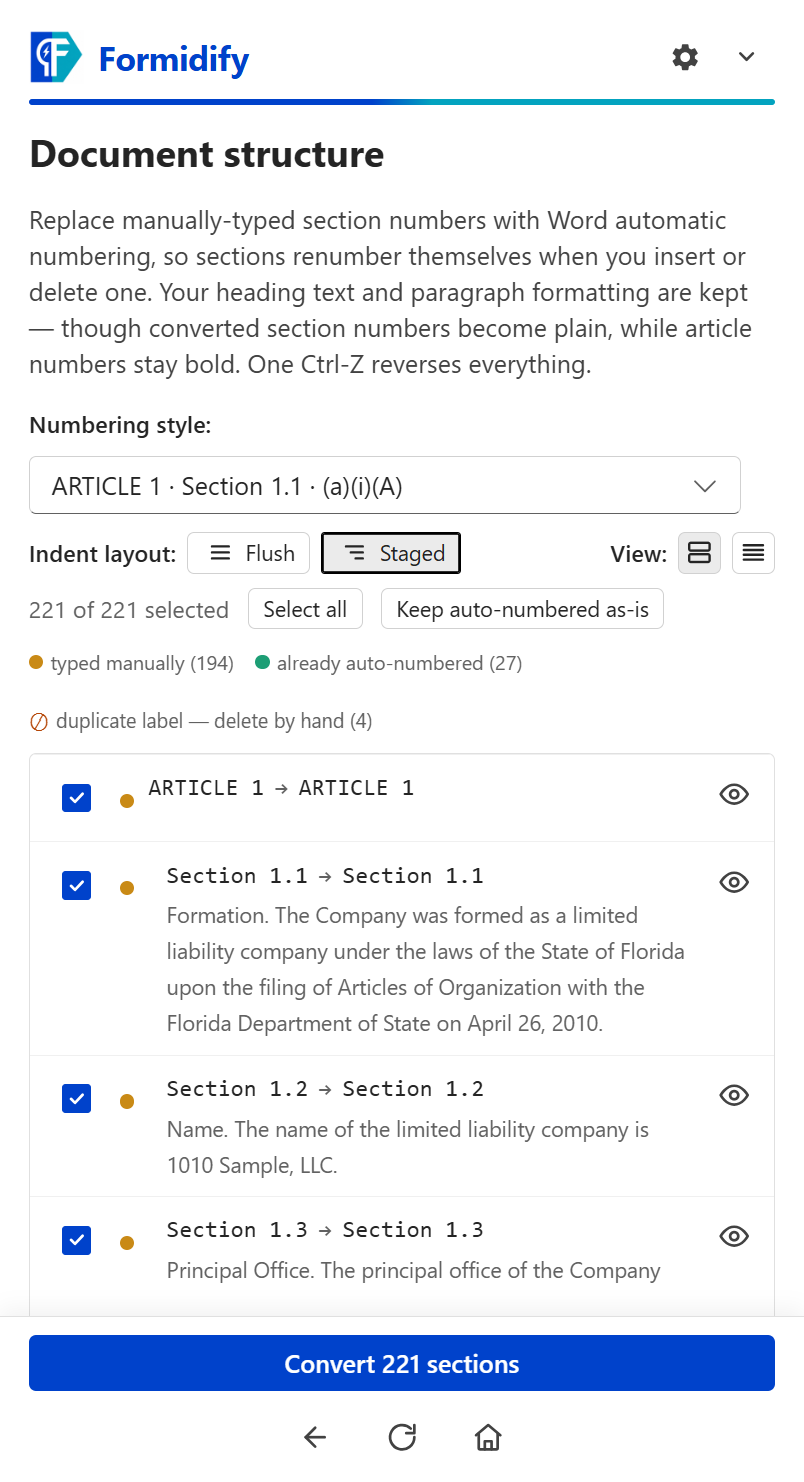
  • Pick the numbering style that matches your house format — 1.1.1, 1(a)(i), Article / Section, and more
  • Preview exactly how every heading will read before anything is touched
  • Fully opt-in, and reversible — a few presses of Ctrl+Z put the document back exactly as it was
Cross-reference checking

Catch references that point nowhere

"…as defined in Section 7.4" — but there is no Section 7.4. Formidify checks every internal cross-reference against the sections that actually exist in the document and flags the ones that don't match up.

  • Broken references are detected automatically, with the nearest real sections to pick from
  • With AI analysis enabled, Formidify also suggests the section you probably meant
  • You confirm every suggestion before it's applied
Privacy by design

Built for privileged documents

Formidify was designed around one rule: the raw text of your document never leaves your machine. The formatting checks run locally inside Word — no part of your document is uploaded to run them.

  • Optional AI analysis sees only redacted structural tokens, never your text
  • Anything you type to Formidify — a support question, a request to add a section — is sent only when you send it
  • Usage statistics are counts and categories only — every field is published in the privacy policy
  • Works in offline mode — rules-based checks need no connection

Read the full privacy policy →

How it works

Analyze → Review → Apply

Three steps, and you stay in control at every one of them.

Analyze

Open your contract and click Analyze in the Formidify pane. It reads the document inside Word and builds a summary — numbering scheme, style usage, fonts, and the issues it found. You choose which categories to review.

Review

Each finding is a card: what the problem is, what's there now, and what Formidify suggests. Jump to the exact paragraph in the document, then accept or skip each fix. Nothing has changed yet.

Apply

All accepted fixes apply in one operation — a single Word undo step. If a fix can't be applied (for example, the document is protected), Formidify tells you which one and why.

One Ctrl+Z normally reverses the entire batch of fixes (a numbering conversion takes two or three presses). Then click Re-analyze to re-check the updated document.

Watch it work

The whole story in 90 seconds

One hand-numbered contract, fixed for good — insert, delete, renumber, undo.

See it in Word

Formidify lives in the Word task pane

No separate app, no uploads — it works on the document you already have open.

Works with Microsoft 365 Word for Windows. In Word on the web you can analyze and fix; numbering conversion and the numbering designer need Word for desktop.

Formidify document summary screen in the Word task pane
The summary after a scan: numbering scheme, style usage, fonts, and issue counts. Click to enlarge
Formidify issue review cards with Accept and Skip buttons
Each issue in plain English, with Current vs. Suggested and Accept / Skip buttons. Click to enlarge
Formidify numbering conversion preview showing the chosen numbering style
Pick a numbering style and preview exactly how every heading will read before applying. Click to enlarge
Why we built this

Built by a lawyer who has been living the problem

Formidify was built by a practicing transactional lawyer — not a software company — after almost 30 years of dealing with formatting failures in document after document, across tens of thousands of them. The numbering that renumbers itself wrong after a late insertion. The cross-reference that quietly points at the wrong section. The hour someone loses cleaning it up the night before a deal closes.

Formidify is the tool I wanted to exist: it lives inside Word, it fixes the plumbing without touching the paint, and it never changes a thing without showing you first.

Mark Albright Founder, Formidify · practicing transactional attorney

Join the Formidify beta

Formidify is in private beta with a small group of firms while we prepare for Microsoft AppSource. If broken numbering and messy formatting are costing your team time, we'd like to hear from you.

Request beta access Or email us at support@formidify.ai — tell us a little about your firm and the documents you work with.